How to Add Water Reflections to AI Renders (2026)
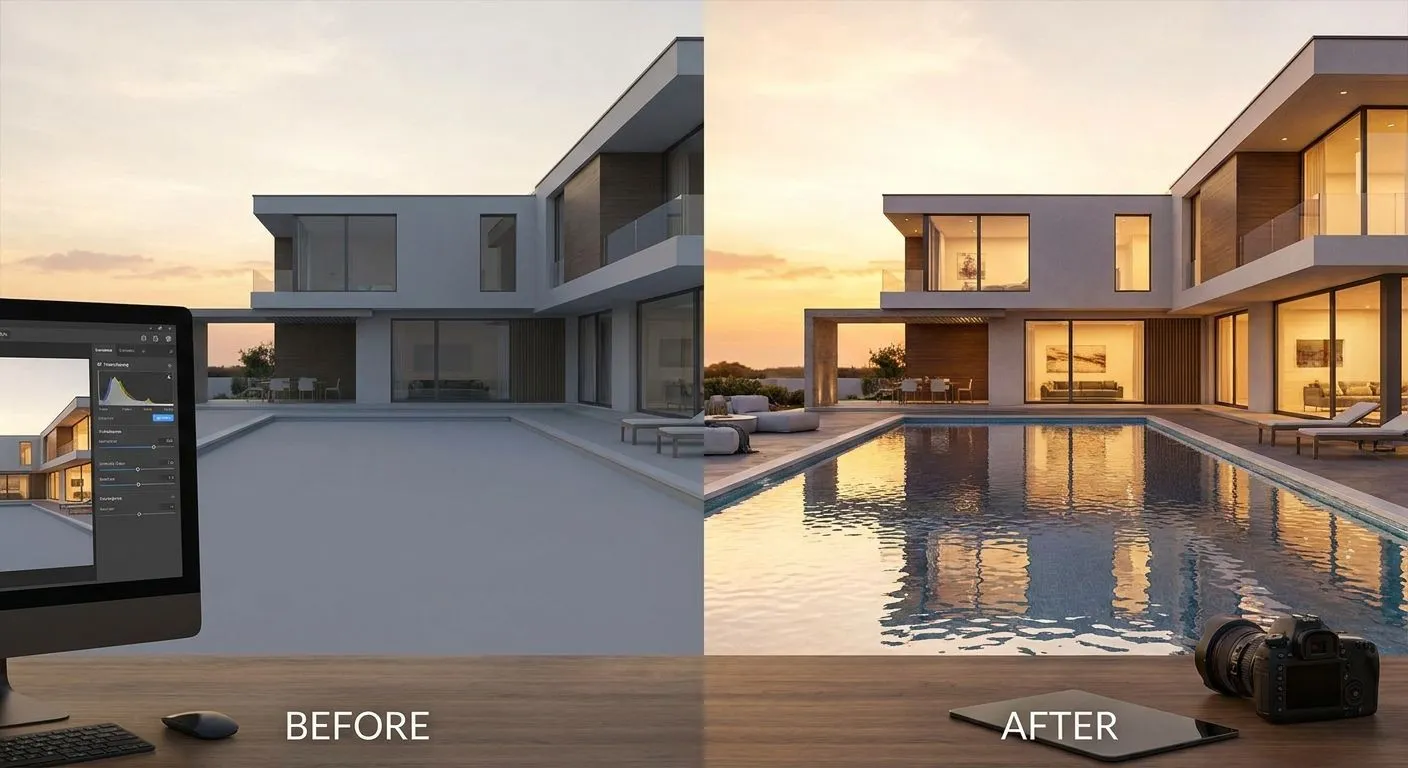
Water and pool reflections turn a flat AI architectural render into something that reads as photographed rather than generated — and you get them by controlling three things in your prompt: the water's material description, the camera angle relative to the waterline, and the lighting direction that the reflection has to mirror. Skip any one of the three and the render either shows a solid blue rectangle where the pool should be, or a reflection that doesn't match the building above it.
The fix isn't a special "reflection mode." It's describing water the way you'd describe any other reflective material — glass, polished stone, chrome — and giving the AI enough visual and text context to know what it's reflecting.
- Describe water as a material (still, rippled, reflective) not just as 'pool' or 'lake' to get accurate reflections.
- Low camera angles near the waterline produce stronger, more convincing reflections than aerial shots.
- Match reflection direction to your lighting setup — reflections mirror the light source, not the camera.
- PromptRender generates the reflection pass from your uploaded screenshot in the same three-step workflow: upload, describe, generate.
- Vague prompts like 'add water' produce flat, opaque water in most AI renders in 2026.
Why this matters
Water is one of the hardest surfaces for any AI rendering tool to interpret correctly, because it has to do two jobs at once: read as a physical surface (color, ripples, edges) and act as a mirror for everything around it (sky, facade, landscaping). Most default renders get the first job right and skip the second, which is why pools and ponds in early-generation AI renders look like flat paint instead of water.
For architects and designers presenting exterior concepts in 2026, a pool or water feature without a reflection is one of the fastest ways to make a render look unfinished to a client who's seen real photography. Getting the reflection right is a prompt-and-setup problem, not a software limitation — PromptRender reads material cues from your uploaded 3D model screenshot and from your text description together, so the more specific you are about the water surface, the more accurate the reflection.
How to add water reflections to AI architectural renders
Follow these steps in order — each one changes a different part of how the reflection gets generated:
- Upload a screenshot with the water feature visible and unobstructed. SketchUp, Revit, Rhino, and Blender all export clean enough geometry for this; just make sure the pool, pond, or water feature isn't cropped out of frame.
- Describe the water as a material, not a label. Instead of "add a pool," write "still reflective pool water, pale blue, mirroring the sky and facade above it." Naming the material and its behavior does more work than naming the object.
- Set the camera angle low, near the waterline. A camera positioned close to eye level over the water surface produces a longer, more visible reflection than an aerial or high three-quarter view, where reflections compress to almost nothing.
- Match the lighting description to the time of day you want reflected. If you specify "late afternoon sun, warm light," the water needs to reflect warm light too — mention it directly: "water reflecting warm late-afternoon light and the building facade."
- Generate, then check the reflection against the light source. If the sun or sky glow in your render sits on the left and the reflection highlight sits on the right, revise the prompt to specify the reflection direction explicitly.
| Water type | Camera angle | Prompt focus |
|---|---|---|
| Pool (calm) | Low, near waterline | "still, mirror-like, reflecting sky and facade" |
| Pond/lake | Low to mid | "slightly rippled, soft reflection, natural color" |
| Fountain/moving water | Mid to high | "broken reflection, movement, white water highlights" |
| Rain puddle | Ground level | "sharp reflective puddle, wet pavement, mirrored lights" |
Pool and calm water reflections
A still pool is the easiest water reflection to get right because it behaves almost exactly like a mirror. Describe it as "still, glass-like water" and name what it should reflect — the facade, the sky color, nearby landscaping. The mistake most people make is describing the pool's color (turquoise, pale blue) without describing its reflectivity, which produces flat, opaque water even in a 2026-generation AI render.
Keep the camera low. A pool shot from directly above shows almost no reflection because you're looking straight down through the water instead of across its surface.
Ocean, lake, and moving water reflections
Moving water breaks reflections into fragments instead of showing a clean mirror image, and your prompt needs to say that explicitly — "rippled surface, broken reflection, soft distortion" reads very differently to the AI than "still water." Lake and ocean shots also benefit from mentioning color gradient: water near the shore is usually lighter and clearer than water further out, and naming that gradient helps the render separate the water from the sky at the horizon line.
For coastal or waterfront exterior renders, pair this technique with the guidance in how to create a photorealistic exterior render with AI — exterior lighting setup and water reflection setup rely on the same core skill: describing light direction consistently across every surface in the scene.
Glass facade and puddle reflections
Reflections aren't limited to pools and ponds. Wet pavement, rain puddles, and glass curtain walls all use the same underlying technique — describe the surface as reflective and name what it mirrors. A puddle in a plaza render should be described as "sharp reflective puddle mirroring the building and streetlights," shot from close to ground level so the reflection has room to show.
Glass facades reflecting a pool or courtyard below work the same way: describe both surfaces (the glass and the water) as reflective in the same prompt, or the AI tends to prioritize one and flatten the other.
Why water reflections vary in quality
A handful of factors decide whether a water reflection reads as convincing or fake:
- Camera height — low angles near the waterline produce longer, clearer reflections; aerial angles compress them almost to nothing.
- Water description specificity — "pool water" produces generic results; "still, mirror-like pool water reflecting the sky" produces a reflection.
- Lighting consistency — the reflection has to match the light source described elsewhere in the prompt, or the two halves of the image visibly disagree.
- Surface movement — still water mirrors cleanly; rippled or moving water needs to be described as broken or distorted, not sharp.
- Surrounding context — a pool reflecting a facade needs that facade clearly visible in the source screenshot; the AI can't reflect what it can't see.
- Time of day — dusk and night scenes add reflected light sources (windows, streetlights) that daytime scenes don't need, which is its own separate prompt skill covered in how to render night and dusk lighting scenes with AI.
“A reflection that doesn't match the light source in the rest of the render is the fastest way to make an AI render look fake.”
Does camera angle really change the reflection that much?
Yes — camera angle is the single biggest factor in how visible a water reflection appears. A low angle near the waterline shows a long, clear reflection because you're looking across the surface; a high or aerial angle looks down through the water instead of across it, which shrinks the visible reflection to almost nothing regardless of how the water is described.
Why does my pool render look flat instead of reflective?
A flat pool render almost always means the prompt described the water's color but not its reflectivity. Add explicit reflective language — "still, mirror-like, reflecting the sky and facade" — and lower the camera angle toward the waterline; both changes matter more than any other single edit.
Can AI renders show moving water accurately?
AI renders can show moving water, but it needs to be described as broken or rippled rather than left as a default still-water prompt. Words like "rippled surface," "soft distortion," or "white water highlights" tell the AI to fragment the reflection instead of rendering a clean mirror image, which is what real moving water looks like.
Generate your next water reflection render
Upload a screenshot, describe the water, generate in seconds.
One last thing
The detail most people miss on their first pass: reflections need to fade or soften slightly the further they get from the object being reflected, exactly like real water does. If you describe a reflection as uniformly sharp across the entire pool surface, it reads as artificial even when every other element of the prompt is correct — mention "reflection softening toward the far edge" and the water surface reads as physical, not painted on.
FAQ
How do I add water reflections to AI architectural renders?
Describe the water as a reflective material rather than just naming it 'pool' or 'lake,' lower the camera angle toward the waterline, and match the reflection's light direction to the rest of the scene. All three adjustments matter — skipping any one produces flat, unconvincing water.
Why does my AI-generated pool look opaque instead of reflective?
An opaque pool almost always means the prompt named the water's color without describing its reflectivity. Add language like 'still, mirror-like, reflecting the sky and facade' to fix it.
What camera angle works best for pool reflections?
A low camera angle near the waterline produces the strongest, longest reflection. Aerial or high three-quarter angles look down through the water and compress the reflection almost to nothing.
Do reflections need to match the lighting in the rest of the render?
Yes, reflections mirror the light source, not the camera position. If your prompt specifies warm late-afternoon light, the water reflection needs to describe that same warm light or the two halves of the render will visibly disagree.
Can PromptRender add reflections to an existing SketchUp or Revit screenshot?
PromptRender generates the reflection as part of the same three-step process — upload the screenshot, describe the water surface and lighting, and generate the render. No separate reflection pass or rendering software is needed.
How do I render moving water like a fountain or ocean waves?
Describe moving water as rippled or broken rather than still — words like 'soft distortion' or 'white water highlights' tell the AI to fragment the reflection the way real moving water does.
Why does my puddle or glass facade reflection look wrong?
Puddle and glass reflections fail for the same reason pool reflections fail: the surface wasn't described as reflective, or the object it should mirror wasn't visible in the source screenshot. Describe both the reflective surface and what it reflects in the same prompt.